
Our plan for today
To get started, download thelab8_programs folder, rename it to include your name,
and save all your python code into this folder. Create a new file
called lab8.py. You will practice accessing open data from
the web in this lab, and you also be writing functions using python dictionaries
(which you have learned about in lecture).
- Build a cs111 student dictionary
- Build a simple word dictionary
- Alternades
- Comma Separated Values
- 50 Things to do Before You Graduate
http://cs.wellesley.edu/~cs111/labs/lab8/data.txt.
Let's use this web file and make a dictionary that has a first name
as key (e.g., 'Anna'), and the year of graduation as the value (e.g. '2018').
You will need to import a Python package to read from a URL (Uniform Resource Locator, or web page):
from urllib2 import *
This module offers a very simple interface to the web, in the form
of the urlopen() function. This is capable of fetching
URLs using a variety of different protocols (more info about urlopen here). This allows you to
write programs which use data from the web (blogs, spreadsheets,
etc.), commonly known as web scraping. On your
pset, you will be doing something like this to read menus from the
Wellesley Dining Halls.
Follow these steps:
- connect your python program to the URL so you can read from the web (
urlopen()) - create an initially empty dictionary (call it
cs111dict) - read from each line in the web file (you can use
split()to break the line into two separate pieces, e.g. "Wendy 2018".split() => ['Wendy','2018'] - create a dictionary entry for each line in the web file where the
keyis the name and thevalueis the year. - check the contents of your dictionary (there should be 74 entries):
-
cs111dict.items() -
cs111dict.keys() cs111dict.values()-
cs111dict['Bella'] -
cs111dict['BugsBunny'] -
cs111dict['2018'] -
'WonderWoman' in cs111dict
-
Building off of Task 0 above, write a fruitful function makeDictionary(url) that takes a URL as a parameter, reads in a text file from the web at that URL, and returns a python
dictionary containing all the words from the file, where each key:value pair has the key
and the value set to a word from the original file.
It doesn’t actually matter what the value is for the key:value pairs for this example, because we only use the
keys as a fast way to check whether a string is in the dictionary.
For the first exercise, we will be reading a simple text file from the web at URL:
http://www.puzzlers.org/pub/wordlists/unixdict.txt
which is a text file containing a single word on each line of the file. To read from
the URL, use the following as the first statement in your function:
	def makeDictionary(url):
		lines = urlopen(url)
The variable lines will then contain a list of each
line (which is a string) in the file.
Warning!
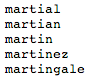
Even though you cannot see it in the webpage (screenshot above), each word has a newline character at the end, like this
'martial\n'. You need to remove the newline
character, otherwise your keys and values will include the newline
character, and then something like this myDict['martial']
will return an error, because the key 'martial' cannot be
found in the dictionary if the key contains the newline character
('martial\n'). You need to strip the
newline character. Look up python's strip() String method.
If the file contained a very short list of words such as:
	board
	waist
	body
Then makeDictonary() would return:
  makeDictionary('http://www.puzzlers.org/pub/wordlists/unixdict.txt') -->
		{'board': 'board', 'waist': 'waist', 'body': 'body'}
The file you are actually using is much larger (25104 entries), so when you test your function and print the result, you will see many more dictionary entries displayed. Also print the length, to verify your result.
NOTE: This particular dictionary contains strings recognized by the unix operating system, so it contains some single letters and strings that you might not normally use as words.
Task 2: AlternadesAn alternade is a word in which its letters, taken alternatively in a strict sequence, and used in the same order as the original word, make up at least two other legal words. All letters must be used, but the smaller words are not necessarily of the same length. For example, a word with seven letters where every second letter is used will produce a four-letter word and a three-letter word. For example, "waist" is an alternade because "wit" and "as" are both words; however, "grape" is NOT an alternade because "gae" is NOT a word and "rp" is NOT a word. Here are two more examples:
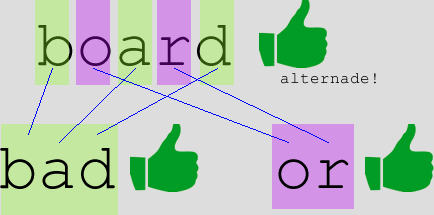
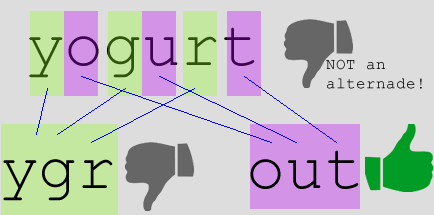
Using the dictionary you produced in task 1, write a fruitful function getAlternades(dictionary) that returns a
new dictionary of all the words that are alternades.
For the short dictionary of three words above, the resulting alternades dictionary should be:
	{board: (bad,or),
         waist: (wit,as)}
When you test your function, it should print 771 alternades (you can easily test this by also printing the length of your result).
Task 3: Comma-Separated Values (CSV)One of the commonly used file formats for storing data is comma-separated values (CSV), also sometimes called character-separated values, because the separator character does not necessarily have to be a comma. Such files store tabular data (numbers and text) in plain-text form. Spreadsheets of data can easily be represented in CSV format.
You will need to import a Python package to read data from a CSV file:
from csv import *
The following URL contains an inventory of US post-secondary universities (from www.data.gov), stored in CSV format, and should be used as the filename to be opened:
http://1.usa.gov/1pkFIvJ
The first row contains headers for each of the 66 columns of information for each school. All remaining rows contain
information for each of the 66 columns for each of the 6800+ schools.
Below is a screenshot of what the data looks like if you were to open the file in Excel (note: we do not want to use Excel, this is just to give you a visual of the data set you are working with):
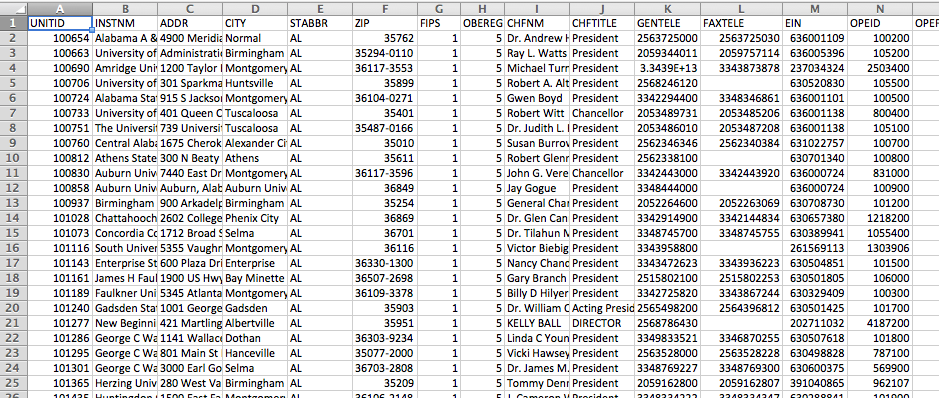
The reader() method from the csv module creates a list of rows, where each row is a list of values for that row. You can copy and paste the code below and place it inside your makeSchools().
# 'rt' means read text, which is the default mode for urlopen
csvFile = urlopen(filename, 'rt')
try:
 	 allRows = reader(csvFile) # reads in all the CSV data from the file
	 # each row in the file is a list of the values in the row
	 for row in allRows:
		print row  # or whatever processing needed per row
finally:
 	 csvFile.close()
Notes about the above code:
-
reader(csvFile)returns an object that can be iterated over, which means we can loop through the contents of the variableallRows. See this page about CSV file reading and writing. -
tryandfinallyallow your code to handle exceptions. In general, we place code inside atrywhen we think something could go wrong when it executes (e.g., cannot read the file, cannot find the file, do not have permission to read the file, file is corrupted, etc). Here is some more documentation about Python's exception handling. - The
forloop above reads eachrowinallRows. The very firstrowwill look like this (because it is the header row, rather than a row containing school data):['UNITID', 'INSTNM', 'ADDR', 'CITY', 'STABBR', 'ZIP', 'FIPS', 'OBEREG', 'CHFNM', 'CHFTITLE', 'GENTELE', 'FAXTELE', 'EIN', 'OPEID', 'OPEFLAG', 'WEBADDR', 'ADMINURL', 'FAIDURL', 'APPLURL', 'NPRICURL', 'SECTOR', 'ICLEVEL', 'CONTROL', 'HLOFFER', 'UGOFFER', 'GROFFER', 'HDEGOFR1', 'DEGGRANT', 'HBCU', 'HOSPITAL', 'MEDICAL', 'TRIBAL', 'LOCALE', 'OPENPUBL', 'ACT', 'NEWID', 'DEATHYR', 'CLOSEDAT', 'CYACTIVE', 'POSTSEC', 'PSEFLAG', 'PSET4FLG', 'RPTMTH', 'IALIAS', 'INSTCAT', 'CCBASIC', 'CCIPUG', 'CCIPGRAD', 'CCUGPROF', 'CCENRPRF', 'CCSIZSET', 'CARNEGIE', 'LANDGRNT', 'INSTSIZE', 'CBSA', 'CBSATYPE', 'CSA', 'NECTA', 'F1SYSTYP', 'F1SYSNAM', 'F1SYSCOD', 'COUNTYCD', 'COUNTYNM', 'CNGDSTCD', 'LONGITUD', 'LATITUDE']
- Here is what the second and third
rows will look like, respectively:['100654', 'Alabama A & M University', '4900 Meridian Street', 'Normal', 'AL', '35762', ' 1', ' 5', 'Dr. Andrew Hugine, Jr.', 'President', '2563725000', '2563725030', '636001109', '00100200', '1', 'www.aamu.edu/', 'www.aamu.edu/admissions/pages/default.aspx', 'www.aamu.edu/Admissions/fincialaid/Pages/default.aspx', 'www.aamu.edu/Admissions/apply/Pages/default.aspx', 'galileo.aamu.edu/netpricecalculator/npcalc.htm', '1', '1', '1', '9', '1', '1', '12', '1', '1', '2', '2', '2', '12', '1', 'A ', '-2', '-2', '-2', '1', '1', '1', '1', '1', 'AAMU', '2', '18', '13', '18', '9', '4', '14', '16', '1', '3', '26620', '1', '290', '-2', '2', ' ', '-2', '1089', 'Madison County', '105', '-86.568502', '34.783368']
['100663', 'University of Alabama at Birmingham', 'Administration Bldg Suite 1070', 'Birmingham', 'AL', '35294-0110', ' 1', ' 5', 'Ray L. Watts', 'President', '2059344011', '2059757114', '636005396', '00105200', '1', 'www.uab.edu', 'www.uab.edu/students/undergraduate-admissions', 'www.uab.edu/students/paying-for-college', 'ssb.it.uab.edu/pls/sctprod/zsapk003_ug_web_appl.create_page', 'www.collegeportraits.org/AL/UAB/estimator/agree', '1', '1', '1', '9', '1', '1', '11', '1', '2', '1', '1', '2', '12', '1', 'A ', '-2', '-2', '-2', '1', '1', '1', '1', '1', ' ', '2', '15', '11', '17', '8', '5', '15', '15', '2', '4', '13820', '1', '142', '-2', '1', 'The University of Alabama System', '101050', '1073', 'Jefferson County', '107', '-86.809170', '33.502230']
- We are only interested in a small subset of those fields, and those will be described in Task 3A below.
Task 3A.Define a function makeSchools(), which reads from the above URL
and returns a dictionary of the schools, using the institution name as the key. The value for each dictionary entry should be
another dictionary, storing 5 of the fields, the unitid (UNITID), city (CITY), state abbreviation (STABBR), chief administrator name (CHFNM)
and web address (WEBADDR) as keys, with their corresponding values.
UNITID is in the 0th column, and
CITY, STABBR, CHFNM and WEBADDR are in the 3rd, 4th, 8th and 15th columns, respectively.
{ 'Alabama A & M University':
  {'CHFNM': 'Dr. Andrew Hugine, Jr.',
  'CITY': 'Normal',
  'STABBR': 'AL',
  'UNITID': '100654',
  'WEBADDR': 'www.aamu.edu/'},
  'University of Alabama at Birmingham':
  {'CHFNM': 'Ray L. Watts',
  'CITY': 'Birmingham',
  'STABBR': 'AL',
  'UNITID': '100663',
  'WEBADDR': 'www.uab.edu'},
     ...

  'Windward Community College':
  {'CHFNM': 'Douglas Dykstra',
  'CITY': 'Kaneohe',
  'STABBR': 'HI',
  'UNITID': '141990',
  'WEBADDR': 'windward.hawaii.edu'},
  'Winebrenner Theological Seminary':
  {'CHFNM': 'David E. Draper',
  'CITY': 'Findlay',
  'STABBR': 'OH',
  'UNITID': '206516',
  'WEBADDR': 'www.winebrenner.edu'},
  'Wingate University':
  {'CHFNM': 'Jerry E. McGee',
  'CITY': 'Wingate',
  'STABBR': 'NC',
  'UNITID': '199962',
  'WEBADDR': 'www.wingate.edu'},
 ...
}
Note: it will take a while to run these functions on the schools data because there are over 6800 schools.
Task 3B.Define a function printSchoolInfo(school,schoolName), that takes the school dictionary
and a school name as a parameter, and prints all five fields for that school.
This is an example of testing the function for a specific school, but you can also test it with other school names from the site:
 schools = makeSchools()
 printSchoolInfo(schools,'Alabama A & M University') -->
   {'WEBADDR': 'www.aamu.edu/', 'CITY': 'Normal', 'STABBR': 'AL', 'CHFNM': 'Dr. Andrew Hugine, Jr.', 'UNITID': '100654'}
Task 3C.Define a function printSchoolsInState(schools,stateabbreviation), that takes the school dictionary and a state abbreviation as a parameter, and prints all the schools in that state.
 schools = makeSchools()
 printSchoolsinState(schools,'HI')-->
 	Chaminade University of Honolulu
	University of Hawaii at Manoa
	Mauna Loa Helicopters
	University of Hawaii Maui College
	Heald College-Honolulu
	Remington College-Honolulu Campus
	Hawaii Medical College
	Honolulu Community College
	Institute of Clinical Acupuncture & Oriental Med
	Kapiolani Community College
	Hawaii Pacific University
	New Hope Christian College-Honolulu
	Med-Assist School of Hawaii Inc
	University of Phoenix-Hawaii Campus
	University of Hawaii at Hilo
	Hawaii Community College
	University of Hawaii-West Oahu
	Paul Mitchell the School-Honolulu
	Hawaii College of Oriental Medicine
	Kauai Community College
	World Medicine Institute
	Windward Community College
	University of Hawaii System Office
	Hawaii Institute of Hair Design
	Brigham Young University-Hawaii
	Travel Institute of the Pacific
	Leeward Community College
	Argosy University-Hawaii
Task 3D. Define a function printSchool(schools,unitid), that takes a UNITID as a parameter, and prints the school (if there is a match), and an error message if there is not a match.
printSchool(schools,455512)-->
     Woodland Community College
printSchool(schools,000000)-->
     ID is not found
Task 4: 50 Things to do Before You Graduate
It is also possible to read data directly from webpages written in HTML. However, there is some work involved in cleaning the
data to remove the HTML tags and extraneous information and distill the page into the essential data that you are interested in.
There are also python modules available for doing these types of tasks, but we will not attempt it in lab today. Instead, let's
assume that we have already processed the Wellesley College 50 Things
to Do Before You Graduate
webpage, and stored the resulting text into a file wellesleyfifty.txt, which is located in the
lab8_programs folder.
Make sure that your pathname in Canopy is set to the folder, so that you can successfully open the text file and read its contents.
Task 4A. Write a function getWellesley50(filename), that takes as a
parameter a text file which contains a string on each line and returns
a dictionary, where each entry in the dictionary has a key which is a word in the file,
with a value which is a list of the lines/strings in the original file which contain
the key.
 print getWellesley50('wellesleyfifty.txt') -->
{'all': ['Eat in all the dining halls in one day.'],
"don't": ["Admit you don't know everything."],
 'other': ['Go to a commencement other than your own.'],
 'protest': ['Stage a protest.'],
 'paper': ['Write a paper in 13-point New York.'],
 'sleep': ['Get 12 hours of sleep in one night.',
        'Let a prospective sleep on your floor.'],
  'wzly': ['Listen to WZLY.'],
  'go': ['Go stepsinging.',
        'Go traying on Severance Green.',
        'Go tunneling.',
        'Go to a Shakespeare Society production.',
        'Go ice skating on Paramecium Pond.',
        "Go trick or treating at the president's house.",
        'Go to a frat party.',
        'Go to a commencement other than your own.'],
   ...}
Task 4B.Write a function queryWellesley50(keyword), that takes a keyword as a
parameters and prints the sentences in the list that use that keyword (for example, if the keyword was stepsinging, the third
item in the list Go stepsinging, would print. If more than one Wellesley 50 uses
that word, then those should also print.
 queryWellesley50('Severance') -->
   Run naked across Severance Green.
   Go traying on Severance Green.