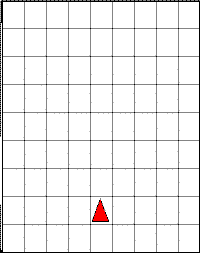
tria.triangle(0);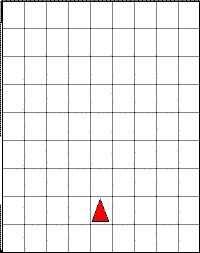
tria.triangle(1);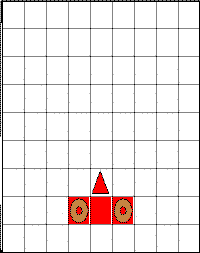
tria.triangle(2);ThrowerWorld
class that is a subclass of BuggleWorld and a
ThrowerBuggle class that is a subclass of Buggle.
// a BuggleWorld in which Buggles throw Bagels
public class ThrowerWorld extends BuggleWorld {
  public void run () {
    ThrowerBuggle tara = new ThrowerBuggle();
    tara.throwBagel(3);
  }
}

class ThrowerBuggle extends Buggle {
  public void throwBagel (int distance) {
    if (distance == 0) {
      dropBagel();
    } else {
      forward();
      throwBagel(distance - 1);
      backward();
    }
  }
}
ThrowerWorld grid) of asking
tara to throw bagels at distances of 0, 1, 2, 3, 4, and 5. Use
a different grid for each distance. The size of the grid doesn't matter (just
make it large enough so the buggle doesn't run into walls). When given
recursive code, it is usually a good idea to draw on paper a couple of
instances of running the code beginning with the easiest case and working up.
Task 1b) Draw a Java Execution Model diagram that shows all of the
execution frames created by invoking the run() method on an
instance of the ThrowerWorld class.
Your diagram should depict the point in time when the invocation of run()
returns. Although Java can discard an execution frame when control returns
from it, you should not discard any frames when drawing your diagram.
In order to distinguish the state of tara at various points in time,
you should follow the convention used in the Friday, October 15 lecture
for showing the state of a buggle at a particular point in time.
That is, you should use a labelled column of variables to represent
one state of a buggle, as shown below, where the names
s1, s2, s3, ... label the states.
| s1 | s2 | s3 | ... | |
|---|---|---|---|---|
| Position | ||||
| Heading | ||||
| Color | ||||
| BrushDown? |
If tara is in the same state at different points in time,
you may reuse an existing state column rather than creating a new one.
When evaluating a variable that refers to tara in the code portion
of an execution frame, you should denote the value as TB1@si ,
where TB1 (which should be circled) denotes tara and
si denotes the state that tara was in
when control evaluated the variable.
triangle method of the
TriangleBuggle class which extends Buggle:
public void triangle(int size) {
  // add your code here
}
triangle method using a
recursive strategy.
The output from creating a TriangleBuggle tria
and starting her at point (5,2) and headed in the direction North before
asking her to draw triangles of different sizes is shown below.
tria.triangle(0); |
tria.triangle(1); |
tria.triangle(2); |
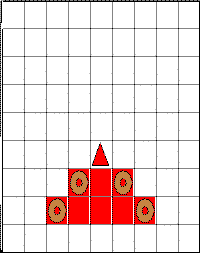 tria.triangle(3); |
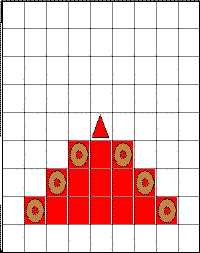 tria.triangle(4); |
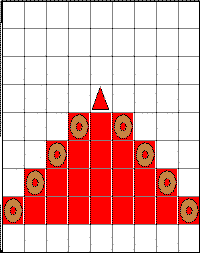 tria.triangle(5); |
When writing the triangle method, you can assume that the
TriangleBuggle has plenty of space to move around
(ie don't worry about bumping into walls).