Problem:
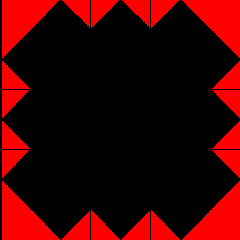
Taking a look at the picture, we try to look for patterns. In particular, it is useful to be on the lookout for the following patterns which are available to us through our contract.
 |
 |
 |
 |
 |
 |
| patch(Color) | triangles(Color1, Color2) | fourPics(P1,P2,P3,P4) | fourSame(P) | rotations(P) | corner(P1,P2) |
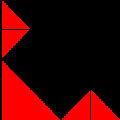
Looking at the frame, we see that we can divide it into four quarters like so:
|
= |
|
We notice that the four quarters look like the same pattern
but the pattern is rotated clockwise 90 degrees as we go from
quadrant to quadrant in a clockwise manner.
Let's call the basic pattern (in the top right corner)
a frameQuarter. We pick that pattern to be the basic pattern
so that we can use the rotations method that is given to us.
The entire frame pattern can now be described by the following
bit of pseudocode
pseudocode: frame = rotations(frameQuarter)
We have now divided the big problem frame into solving a smaller subproblem frameQuarter. The pseudocode above tells us how to glue the subproblem solution together to form the solution to the original problem.
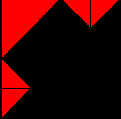
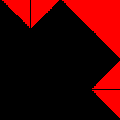
Now we need to figure out how to create a frameQuarter. Since it's not entirely obvious, we again apply the Divide, Conquer, and Glue strategy. Taking a look at the frameQuarter, we notice that we can also divide that into four quarters like so:
 |
= |
|
We see that we have a black patch in the bottom left quadrant and
black red triangles in the top right quadrant. We also notice that
the other two quadrants have the same pattern. Let's call this pattern
framePattern and assign it to the pattern in the top left corner.
The relationship between the two similar patterns can be expressed as follows:
Take this  and rotate it 90 degrees clockwise to get and rotate it 90 degrees clockwise to get

|
frameQuarter = fourPics(framePattern, blackRedTriangle, blackPatch, clockwise90(framePattern))Now we need to figure out how to create a framePattern. We can again divide this pattern into quadrants like so:
|
= |
|
Take this
 and
and |
flip it vertically | to get

|
| rotate it 270 degrees clockwise |
Take this
 and rotate it 90 degrees clockwise to get
|
Now we can write the following bit of pseudocode
pseudocode: framePattern = fourPics(blackRedTriangles, flipVertically(blackRedTriangles), blackPatch, blackPatch)
We have now divided the big problem framePattern into basic building blocks so now we can conquer this problem!
Now we need to write the actual code to create the framePattern. We should write the code so that we can generate frames of any two colors. To do this, let's first decide how to label our colors. Why don't we do the following:

c1 will be the color that fills the bottom and most of the pattern
c2 will be the other color which colors the triangles
Here's our code for the framePattern method which will return the framePattern Picture:
public Picture framePattern (Color c1, Color c2) {
  Picture c1Patch = patch(c1);   // create a patch of Color c1
  Picture c1c2Triangles = triangles(c1, c2);   // create triangles of Colors c1 and c2
  return fourPics(c1c2Triangles, flipVertically(c1c2Triangles), c1Patch, c1Patch);
}
Now that we have a solution for framePattern, we can write
up our solution for frameQuarter.
First, though, we need to
decide how to label our colors. Let's agree on the following:
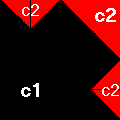
c1 will be the color that fills the bottom and most of the pattern
c2 will be the other color which colors the triangles
Here's our code for frameQuarter
public Picture frameQuarter (Color c1, Color c2) {
  Picture pattern = framePattern(c1, c2); // create a frame pattern
  Picture c1c2Triangle = triangles(c1, c2); // create triangles of Colors c1 and c2
  Picture c1Patch = patch(c1); // create a patch of Color c1
  return fourPics(pattern, c1c2Triangle, c1Patch, clockwise90(pattern));
}
Now that we have a solution for frameQuarter, we can write
up our solution for frame. Here it is
public Picture frame (Color c1, Color c2) {
  return rotations(frameQuarter(c1,c2));
}
To actually see our solutions we need to add picture choices to our applet. Add the following code to the initializePictureChoices method to see the solution to the main problem and all the subproblems that we solved.
// see the frame
addPictureChoice("frame", frame(Color.black, Color.red));

// see the frameQuarter
addPictureChoice("frameQuarter", frameQuarter(Color.black, Color.red));

// see the framePattern
addPictureChoice("framePattern", framePattern(Color.black, Color.red));