CartesianRectangle:
public class CartesianRectangle {
  // The CartesianRectangle is an implementation of a Rectangle in the Cartesian coordinate system
  // (i.e. like TurtleWorld, and not like the Java graphics coordinate system).

  // instance variables
  // This representation of a rectangle stores the x and y coordinates of opposite corners of the rectangle.
  // For example, if a rectangl spanned from (10,20) to (50,40),
  // xcoords = {10,50}
  // ycoords = {20,40}
  public int[] xcoords; // stores the x-coordinates of one diagonal of the rectangle
  public int[] ycoords; // stores the y-coordinates of one diagonal of the rectangle
  public Color color; // color of rectangle
  public boolean fillMode; // true if filled; false otherwise

  // Constructor which takes the coordinates of the two opposite corners of the rectangle.
  public CartesianRectangle (int x1, int y1, int x2, int y2, Color c, boolean fillMode) {
    // One way to initialize an array.
    xcoords = new int[2];
    xcoords[0] = x1;
    xcoords[1] = x2;

    // Another way to initialize an array.
    // This shortcut notation only works in a variable declaration. So we can not just say
    // ycoords = {y1,y2};
    // because the above line is not a variable declaration.
    // Instead, we create a temporary local variable in order to quickly initialize the array.
    int[] yArray = {y1,y2};
    ycoords = yArray;

    color = c;
    this.fillMode = fillMode;
  }

  // Constructor which takes two integer arrays. Only for use within the class.
  private CartesianRectangle (int[] x, int[] y, Color c, boolean fillMode) {
    xcoords = copyArray(x);
    ycoords = copyArray(y);

    color = c;
    this.fillMode = fillMode;
  }

  // Instance methods.
  // Methods which act on the current rectangle.
  public void translate (int dx, int dy) {
    // Moves the CartesianRectangle in the x direction by dx and in the y direction by dy.
    xcoords[0]+=dx;
    ycoords[0]+=dy;
    xcoords[1]+=dx;
    ycoords[1]+=dy;
  }

  public void flipHorizontally () {
    // Flips the CartesianRectangle around the horizontal x-axis.
    ycoords[0] = -ycoords[0];
    ycoords[1] = -ycoords[1];
  }

  public void flipVertically () {
    // Flips the CartesianRectangle around the vertical y-axis.
    xcoords[0] = -xcoords[0];
    xcoords[1] = -xcoords[1];
  }

  public void flipDiagonally () {
    // Flips the CartesianRectangle around the line y=x.
    int temp = xcoords[0];
    xcoords[0] = ycoords[0];
    ycoords[0] = temp;
    temp = xcoords[1];
    xcoords[1] = ycoords[1];
    ycoords[1] = temp;
  }

  // Methods which return a new CartesianRectangle which is a variation of the original one.
  public CartesianRectangle copy () {
    // Returns a CartesianRectangle which is a copy of the original CartesianRectangle.
    return new CartesianRectangle (xcoords, ycoords, color, fillMode);
  }

  public CartesianRectangle flipHorizontallyRect () {
    // Returns a new CartesianRectangle which is the original CartesianRectangle
    // flipped around the horizontal x-axis.
    int[] newYcoords = {-ycoords[0], -ycoords[1]};
    return new CartesianRectangle(xcoords, newYcoords, color, fillMode);
  }

  public CartesianRectangle flipVerticallyRect () {
    // Returns a new CartesianRectangle which is the original CartesianRectangle
    // flipped around the vertical y-axis.
    int[] newXcoords = {-xcoords[0], -xcoords[1]};
    return new CartesianRectangle(newXcoords, ycoords, color, fillMode);
  }

  public CartesianRectangle flipDiagonallyRect () {
    // Returns a new CartesianRectangle which is the original CartesianRectangle
    // flipped around the line y=x.
    return new CartesianRectangle(ycoords, xcoords, color, fillMode);
  }

  public String name () {
    return "CartesianRectangle";
  }

  public String toString() {
  	return name() + "[("+xcoords[0]+","+ycoords[0]+") to ("+xcoords[1]+","+ycoords[1]+")"
  		+ "; color="+colorToString(color)+"; fillMode="+fillMode+"]";
  }

  // class methods

  protected static int [] copyArray(int [] a) {
    // Returns a copy of the given array.
    int [] result = new int [a.length];
    for (int i = 0; i < a.length; i++) {
    result[i] = a[i];
    }
    return result;
  }

  // For common colors, returns a short name for the color.
  // For less common colors, returns the more verbose string representation.
  protected static String colorToString (Color c) {
    if (c.equals(Color.black)) {
      return "black";
    } else if (c.equals(Color.blue)) {
      return "blue";
    } else if (c.equals(Color.cyan)) {
      return "cyan";
    } else if (c.equals(Color.green)) {
      return "green";
    } else if (c.equals(Color.magenta)) {
      return "magenta";
    } else if (c.equals(Color.orange)) {
      return "orange";
    } else if (c.equals(Color.pink)) {
      return "pink";
    } else if (c.equals(Color.red)) {
      return "red";
    } else if (c.equals(Color.white)) {
      return "white";
    } else if (c.equals(Color.yellow)) {
      return "yellow";
    } else {
      return c.toString();
    }
  }

}
Task 1 Draw the object diagram for the following sequence of actions:
CartesianRectangle r1 = new CartesianRectangle(10,20,50,40,Color.blue,true);
r1.flipHorizontally();
CartesianRectangle r2 = r1.copy();
r1.color = Color.red;
r2.translate(-5,5);
CartesianRectangle r3 = r1.flipVerticallyRect();
r2.xcoords = r3.ycoords;
r3.ycoords[1] = 50;
r1.fillMode = !(r2.fillMode && r3.fillMode);
Task 2 What if the constructor method which takes integer arrays had been defined as follows:
private CartesianRectangle (int[] x, int[] y, Color c, boolean fillMode) {
  xcoords = x;
  ycoords = y;
  color = c;
  this.fillMode = fillMode;
}
FigureStackArray classFigureStackArray class is a simple implementation of the FigureStack
contract using arrays. The class and contract are described in problem set 10. The information is
duplicated below:
Contract for the FigureStack class
abstract public void draw (Graphics g);
Draws figures in this FigureStack from bottom up
abstract public Figure find (int x, int y);
Returns the topmost figure in this FigureStack whose bounding box contains the point (x,y).
If there is no such figure returns null (i.e., Java's way of writing the null pointer).
abstract public void add (Figure f);
Adds the given figure to the top of this FigureStack.
abstract public void insertAtBottom (Figure f);
Inserts the given figure to the bottom of this FigureStack.
abstract public void remove (Figure f);
Removes the given figure from this FigureStack. Assume the given figure occurs at most once in FigureStack.
FigureStackArray Description
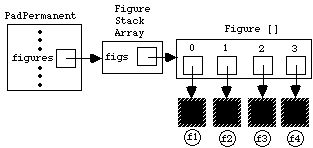
Adding f4 to the figure stack would yield
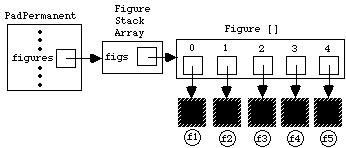
and subsequently adding f5 would yield:
Finally, deleting f3 would give the following:

FigureStackArray class
public class FigureStackArray extends FigureStack {

  //----------------------------------------------------------------------
  // INSTANCE VARIABLES

  private Figure [] figs; // Array of figures, ordered from bottom to top.

  //----------------------------------------------------------------------
  // CONSTRUCTOR METHOD

  public FigureStackArray () {
    // Flesh out this skeleton.


  }

  //----------------------------------------------------------------------
  // INSTANCE METHODS

  // Draws figures in this FigureStack from bottom up
  public void draw (Graphics g) {
    // Flesh out this skeleton.


  }

  // Returns the topmost figure in this FigureStack whose bounding box
  // contains the point (x,y). If there is no such figure returns null.
  // (i.e., Java's way of writing the null pointer).
  public Figure find (int x, int y) {
    // Replace this stub:
    return null;


  }

  // Adds the given figure to the top of this FigureStack.
  public void add (Figure f) {
    // Flesh out this skeleton.


  }

  // Inserts the given figure to the bottom of this FigureStack.
  public void insertAtBottom (Figure f) {
    // Flesh out this skeleton.


  }

  // Removes the given figure from this FigureStack.
  // Assume the given figure occurs at most once in FigureStack.
  public void remove (Figure f) {
    // Flesh out this skeleton.


  }

  // Add any auxiliary methods below


}