 Graphic by Keith Ohlfs |
|
|
Graphic by Keith Ohlfs |
|
isBst, isInTree, and pathList
have been changed and the base case for delete has been changed.The purpose of this problem set is to give you experience with three topics: lists of lists, binary trees, and iteration. For the list of lists problem we will be working with the IntListList data structure which is described in the reading for this problem set. There are three problems in this problem set. Problems 2 and 3 have multiple tasks.
Softcopy submission: Save the modified ChangeMaker.java, BST.java and NestedFrames.java files
in the ps8_programs folder. Upload the entire folder (including all the other .java
and .class files -- everything) to your ps8 drop folder.
Hardcopy submission: Turn in only one package of hardcopy materials. Staple your files together and submit your hardcopy package by placing it in the box outside of Lyn's office (121B, behind the mini-focus consultant's desk). Your package should include printouts of
ChangeMaker.java from Homework Problem 1
BST.java from Homework Problem 2
NestedFrames.java from Homework Problem 3
Reminders
Lists of lists are useful data structures for holding lists of possibilities. We can use them to hold the list of all permutations of a set of numbers like we saw done in lab. The problem here will be to use lists of lists to represent all the possible ways of making change for a given amount of money given an unlimited amount of certain denominations. Some examples are given below (assume all values are in cents).
| Amount to change | Denominations | Ways to Make Change |
|---|---|---|
| 5 | [5,1] | [[5], [1,1,1,1,1] ]1 nickel or 5 pennies |
| 16 | [10,5,1] | [[10, 5, 1], [10, 1, 1, 1, 1, 1, 1], [5, 5, 5, 1], [5, 5, 1, 1, 1, 1, 1, 1], [5, 1, 1, 1, 1, 1, 1, 1, 1, 1, 1, 1], [1, 1, 1, 1, 1, 1, 1, 1, 1, 1, 1, 1, 1, 1, 1, 1] ] |
Your goal is to formulate a strategy that will list all the possible
ways to make change for a given amount of money with a list of possible
denominations provided in descending order of value. You will be completing
the method makeChange of the ChangeMaker class.
The skeleton for the method is provided below:
public static IntListList makeChange (int amount, IntList coins)
Returns a list of possible ways to make change for the amount specified with the coins available. Assume coins are given in descending order of value.
makeChange involves working with IntList and IntListList
lists, we can no longer just use list methods and operators without the class name because Java
won't know which method we want (i.e. do we want the one that applies to the IntList or
the IntListList class?). Instead, we must specify the name of the class with the
method (e.g. IntList.prepend or IntListList.prepend). However,
specifying the full name of the class makes the code harder to read so we have provided you with
the following "shortcut" way to refer to IntList and IntListList methods and operators
for doing this problem.
| IntList Methods (IL) | IntList Operators (ILO) | IntListList Methods (ILL) | IntListList Operators (ILLO) |
|---|---|---|---|
IL.empty IL.prepend IL.head IL.tail IL.isEmpty |
ILO.length ILO.append ILO.postpend |
ILL.empty ILL.prepend ILL.head ILL.tail ILL.isEmpty |
ILLO.length ILLO.append ILLO.postpend |
Correct Test Case Answers
----------------------------------------------------
There are 2 ways to make change for 5 cents using [10, 5, 1]:
[[5],
 [1, 1, 1, 1, 1]
 ]
----------------------------------------------------
There are 6 ways to make change for 16 cents using [10, 5, 1]:
[[10, 5, 1],
 [10, 1, 1, 1, 1, 1, 1],
 [5, 5, 5, 1],
 [5, 5, 1, 1, 1, 1, 1, 1],
 [5, 1, 1, 1, 1, 1, 1, 1, 1, 1, 1, 1],
 [1, 1, 1, 1, 1, 1, 1, 1, 1, 1, 1, 1, 1, 1, 1, 1]
 ]
----------------------------------------------------
There are 13 ways to make change for 26 cents using [25, 10, 5, 1]:
[[25, 1],
 [10, 10, 5, 1],
 [10, 10, 1, 1, 1, 1, 1, 1],
 [10, 5, 5, 5, 1],
 [10, 5, 5, 1, 1, 1, 1, 1, 1],
 [10, 5, 1, 1, 1, 1, 1, 1, 1, 1, 1, 1, 1],
 [10, 1, 1, 1, 1, 1, 1, 1, 1, 1, 1, 1, 1, 1, 1, 1, 1],
 [5, 5, 5, 5, 5, 1],
 [5, 5, 5, 5, 1, 1, 1, 1, 1, 1],
 [5, 5, 5, 1, 1, 1, 1, 1, 1, 1, 1, 1, 1, 1],
 [5, 5, 1, 1, 1, 1, 1, 1, 1, 1, 1, 1, 1, 1, 1, 1, 1, 1],
 [5, 1, 1, 1, 1, 1, 1, 1, 1, 1, 1, 1, 1, 1, 1, 1, 1, 1, 1, 1, 1, 1],
 [1, 1, 1, 1, 1, 1, 1, 1, 1, 1, 1, 1, 1, 1, 1, 1, 1, 1, 1, 1, 1, 1, 1, 1, 1, 1]
 ]
----------------------------------------------------
There are 60 ways to make change for 56 cents using [25, 10, 5, 1]:
[[25, 25, 5, 1],
 [25, 25, 1, 1, 1, 1, 1, 1],
 [25, 10, 10, 10, 1],
 [25, 10, 10, 5, 5, 1],
 [25, 10, 10, 5, 1, 1, 1, 1, 1, 1],
 [25, 10, 10, 1, 1, 1, 1, 1, 1, 1, 1, 1, 1, 1],
 [25, 10, 5, 5, 5, 5, 1],
 [25, 10, 5, 5, 5, 1, 1, 1, 1, 1, 1],
 [25, 10, 5, 5, 1, 1, 1, 1, 1, 1, 1, 1, 1, 1, 1],
 [25, 10, 5, 1, 1, 1, 1, 1, 1, 1, 1, 1, 1, 1, 1, 1, 1, 1, 1],
 [25, 10, 1, 1, 1, 1, 1, 1, 1, 1, 1, 1, 1, 1, 1, 1, 1, 1, 1, 1, 1, 1, 1],
 [25, 5, 5, 5, 5, 5, 5, 1],
 [25, 5, 5, 5, 5, 5, 1, 1, 1, 1, 1, 1],
 [25, 5, 5, 5, 5, 1, 1, 1, 1, 1, 1, 1, 1, 1, 1, 1],
 [25, 5, 5, 5, 1, 1, 1, 1, 1, 1, 1, 1, 1, 1, 1, 1, 1, 1, 1, 1],
 [25, 5, 5, 1, 1, 1, 1, 1, 1, 1, 1, 1, 1, 1, 1, 1, 1, 1, 1, 1, 1, 1, 1, 1],
 [25, 5, 1, 1, 1, 1, 1, 1, 1, 1, 1, 1, 1, 1, 1, 1, 1, 1, 1, 1, 1, 1, 1, 1, 1, 1, 1, 1],
 [25, 1, 1, 1, 1, 1, 1, 1, 1, 1, 1, 1, 1, 1, 1, 1, 1, 1, 1, 1, 1, 1, 1, 1, 1, 1, 1, 1, 1, 1, 1, 1],
 [10, 10, 10, 10, 10, 5, 1],
 [10, 10, 10, 10, 10, 1, 1, 1, 1, 1, 1],
 [10, 10, 10, 10, 5, 5, 5, 1],
 [10, 10, 10, 10, 5, 5, 1, 1, 1, 1, 1, 1],
 [10, 10, 10, 10, 5, 1, 1, 1, 1, 1, 1, 1, 1, 1, 1, 1],
 [10, 10, 10, 10, 1, 1, 1, 1, 1, 1, 1, 1, 1, 1, 1, 1, 1, 1, 1, 1],
 [10, 10, 10, 5, 5, 5, 5, 5, 1],
 [10, 10, 10, 5, 5, 5, 5, 1, 1, 1, 1, 1, 1],
 [10, 10, 10, 5, 5, 5, 1, 1, 1, 1, 1, 1, 1, 1, 1, 1, 1],
 [10, 10, 10, 5, 5, 1, 1, 1, 1, 1, 1, 1, 1, 1, 1, 1, 1, 1, 1, 1, 1],
 [10, 10, 10, 5, 1, 1, 1, 1, 1, 1, 1, 1, 1, 1, 1, 1, 1, 1, 1, 1, 1, 1, 1, 1, 1],
 [10, 10, 10, 1, 1, 1, 1, 1, 1, 1, 1, 1, 1, 1, 1, 1, 1, 1, 1, 1, 1, 1, 1, 1, 1, 1, 1, 1, 1],
 [10, 10, 5, 5, 5, 5, 5, 5, 5, 1],
 [10, 10, 5, 5, 5, 5, 5, 5, 1, 1, 1, 1, 1, 1],
 [10, 10, 5, 5, 5, 5, 5, 1, 1, 1, 1, 1, 1, 1, 1, 1, 1, 1],
 [10, 10, 5, 5, 5, 5, 1, 1, 1, 1, 1, 1, 1, 1, 1, 1, 1, 1, 1, 1, 1, 1],
 [10, 10, 5, 5, 5, 1, 1, 1, 1, 1, 1, 1, 1, 1, 1, 1, 1, 1, 1, 1, 1, 1, 1, 1, 1, 1],
 [10, 10, 5, 5, 1, 1, 1, 1, 1, 1, 1, 1, 1, 1, 1, 1, 1, 1, 1, 1, 1, 1, 1, 1, 1, 1, 1, 1, 1, 1],
 [10, 10, 5, 1, 1, 1, 1, 1, 1, 1, 1, 1, 1, 1, 1, 1, 1, 1, 1, 1, 1, 1, 1, 1, 1, 1, 1, 1, 1, 1, 1, 1, 1, 1],
 [10, 10, 1, 1, 1, 1, 1, 1, 1, 1, 1, 1, 1, 1, 1, 1, 1, 1, 1, 1, 1, 1, 1, 1, 1, 1, 1, 1, 1, 1, 1, 1, 1, 1, 1, 1, 1, 1],
 [10, 5, 5, 5, 5, 5, 5, 5, 5, 5, 1],
 [10, 5, 5, 5, 5, 5, 5, 5, 5, 1, 1, 1, 1, 1, 1],
 [10, 5, 5, 5, 5, 5, 5, 5, 1, 1, 1, 1, 1, 1, 1, 1, 1, 1, 1],
 [10, 5, 5, 5, 5, 5, 5, 1, 1, 1, 1, 1, 1, 1, 1, 1, 1, 1, 1, 1, 1, 1, 1],
 [10, 5, 5, 5, 5, 5, 1, 1, 1, 1, 1, 1, 1, 1, 1, 1, 1, 1, 1, 1, 1, 1, 1, 1, 1, 1, 1],
 [10, 5, 5, 5, 5, 1, 1, 1, 1, 1, 1, 1, 1, 1, 1, 1, 1, 1, 1, 1, 1, 1, 1, 1, 1, 1, 1, 1, 1, 1, 1],
 [10, 5, 5, 5, 1, 1, 1, 1, 1, 1, 1, 1, 1, 1, 1, 1, 1, 1, 1, 1, 1, 1, 1, 1, 1, 1, 1, 1, 1, 1, 1, 1, 1, 1, 1],
 [10, 5, 5, 1, 1, 1, 1, 1, 1, 1, 1, 1, 1, 1, 1, 1, 1, 1, 1, 1, 1, 1, 1, 1, 1, 1, 1, 1, 1, 1, 1, 1, 1, 1, 1, 1, 1, 1, 1],
 [10, 5, 1, 1, 1, 1, 1, 1, 1, 1, 1, 1, 1, 1, 1, 1, 1, 1, 1, 1, 1, 1, 1, 1, 1, 1, 1, 1, 1, 1, 1, 1, 1, 1, 1, 1, 1, 1, 1, 1, 1, 1, 1],
 [10, 1, 1, 1, 1, 1, 1, 1, 1, 1, 1, 1, 1, 1, 1, 1, 1, 1, 1, 1, 1, 1, 1, 1, 1, 1, 1, 1, 1, 1, 1, 1, 1, 1, 1, 1, 1, 1, 1, 1, 1, 1, 1, 1, 1, 1, 1],
 [5, 5, 5, 5, 5, 5, 5, 5, 5, 5, 5, 1],
 [5, 5, 5, 5, 5, 5, 5, 5, 5, 5, 1, 1, 1, 1, 1, 1],
 [5, 5, 5, 5, 5, 5, 5, 5, 5, 1, 1, 1, 1, 1, 1, 1, 1, 1, 1, 1],
 [5, 5, 5, 5, 5, 5, 5, 5, 1, 1, 1, 1, 1, 1, 1, 1, 1, 1, 1, 1, 1, 1, 1, 1],
 [5, 5, 5, 5, 5, 5, 5, 1, 1, 1, 1, 1, 1, 1, 1, 1, 1, 1, 1, 1, 1, 1, 1, 1, 1, 1, 1, 1],
 [5, 5, 5, 5, 5, 5, 1, 1, 1, 1, 1, 1, 1, 1, 1, 1, 1, 1, 1, 1, 1, 1, 1, 1, 1, 1, 1, 1, 1, 1, 1, 1],
 [5, 5, 5, 5, 5, 1, 1, 1, 1, 1, 1, 1, 1, 1, 1, 1, 1, 1, 1, 1, 1, 1, 1, 1, 1, 1, 1, 1, 1, 1, 1, 1, 1, 1, 1, 1],
 [5, 5, 5, 5, 1, 1, 1, 1, 1, 1, 1, 1, 1, 1, 1, 1, 1, 1, 1, 1, 1, 1, 1, 1, 1, 1, 1, 1, 1, 1, 1, 1, 1, 1, 1, 1, 1, 1, 1, 1],
 [5, 5, 5, 1, 1, 1, 1, 1, 1, 1, 1, 1, 1, 1, 1, 1, 1, 1, 1, 1, 1, 1, 1, 1, 1, 1, 1, 1, 1, 1, 1, 1, 1, 1, 1, 1, 1, 1, 1, 1, 1, 1, 1, 1],
 [5, 5, 1, 1, 1, 1, 1, 1, 1, 1, 1, 1, 1, 1, 1, 1, 1, 1, 1, 1, 1, 1, 1, 1, 1, 1, 1, 1, 1, 1, 1, 1, 1, 1, 1, 1, 1, 1, 1, 1, 1, 1, 1, 1, 1, 1, 1, 1],
 [5, 1, 1, 1, 1, 1, 1, 1, 1, 1, 1, 1, 1, 1, 1, 1, 1, 1, 1, 1, 1, 1, 1, 1, 1, 1, 1, 1, 1, 1, 1, 1, 1, 1, 1, 1, 1, 1, 1, 1, 1, 1, 1, 1, 1, 1, 1, 1, 1, 1, 1, 1],
 [1, 1, 1, 1, 1, 1, 1, 1, 1, 1, 1, 1, 1, 1, 1, 1, 1, 1, 1, 1, 1, 1, 1, 1, 1, 1, 1, 1, 1, 1, 1, 1, 1, 1, 1, 1, 1, 1, 1, 1, 1, 1, 1, 1, 1, 1, 1, 1, 1, 1, 1, 1, 1, 1, 1, 1]
 ]
----------------------------------------------------
There are 2 ways to make change for 15 cents using [10, 5]:
[[10, 5],
 [5, 5, 5]
 ]
----------------------------------------------------
There are 0 ways to make change for 16 cents using [10, 5]:
[ ]
----------------------------------------------------
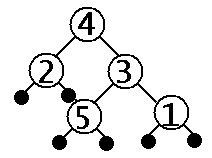
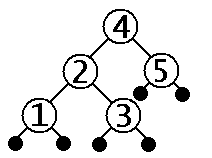
A binary search tree (BST) is a tree which encode the binary search strategy. A BST has the property that each tree node contains a value which is greater than or equal to all the values in its left subtree and less than or equal to all the values in its right subtree. For a given set of numbers, there are multiple ways to arrange them into a binary tree that meets the binary search tree property. For example, given the set of numbers (1,2,3,4,5) we can arrange them into binary trees as shown below:
| not a binary search tree | binary search tree 1 | binary search tree 2 |
|---|---|---|
 |
 |
 |
We can implement a binary search tree involving integers in Java by extending the
IntTree class.
A binary search tree is a kind of IntTree with additional properties.
To do this, we will create a new class called BST and inside the class
we will place useful methods for working with binary search trees.
public class BST extends IntTree {
  // place useful binary search tree methods here
}
The following methods have been defined for you already. These are all methods
that you should be able to write yourself.
public static int min (IntTree bst) {
  // Returns the minimum value in an integer binary search tree;
  // returns the maximum integer value if given a leaf.
  if (isLeaf(bst)) {
    return Integer.MAX_VALUE;
  } else if (isLeaf(left(bst))) {
    return value(bst);
  } else {
    return min(left(bst));
  }
}

public static int max (IntTree bst) {
  // Returns the maximum value in an integer binary search tree;
  // returns the minimum integer value if given a leaf.
  if (isLeaf(bst)) {
    return Integer.MIN_VALUE;
  } else if (isLeaf(right(bst))) {
    return value(bst);
  } else {
    return max(right(bst));
  }
}

public static boolean isBST (IntTree t) {
  // Returns true if t is an integer binary search tree; otherwise, returns false.
  if (isLeaf(t)) {
    return true;
  } else {
    return (value(t)>=max(left(t))) &&
           (value(t)<=min(right(t))) &&
           isBST(left(t)) && isBST(right(t));
  }
}

public static boolean isInTree (int n, IntTree bst) {
  // Returns true is n is in the binary search tree; otherwise, returns false.
  if (isLeaf(bst)) {
    return false;
  } else if (n==value(bst)) {
    return true;
  } else if (n < value(bst)) {
    return isInTree(n, left(bst));
  } else { // (n > value(bst))
    return isInTree(n, right(bst));
  }
}

public static IntList pathList (int v, IntTree bst) {
  // Returns a list of the values one must pass through while searching for the value v in the tree.
  if (isLeaf(bst)) {
    return IL.empty();
  } else if (v == value(bst)) {
    return IL.prepend(v, IL.empty());
  } else if (v < value(bst)) {
    return IL.prepend(value(bst), pathList(v,left(bst)));
  } else { // v > value(bst)
    return IL.prepend(value(bst), pathList(v,right(bst)));
  }
}
This problem involves three tasks described below:
insertinsert
is provided below:
public static IntTree insert (int x, IntTree bst) {
  // Returns the result of inserting x in bst.
  if (isLeaf(bst)) {
    return node(x, leaf(), leaf());
  } else if (x>value(bst)) {
    return node(value(bst),
                left(bst),
                insert(x,right(bst)));
  } else { // x<=value(bst)
    return node(value(bst),
                insert(x,left(bst)),
                right(bst));
  }
}
Task 1a: Explain clearly, but succinctly, in words (English) how the stategy
for inserting an integer into a binary tree works.
Task 1b: Draw the box-and-pointer diagram for the following sequence of actions:
IntTree t1 = node(10,
                  node(5
                       node(3,leaf(),leaf()),
                       node(8,leaf(),leaf())),
                  node(12,
                       leaf(),
                       node(17,
                            node(13,leaf(),leaf()),
                            leaf())));
IntTree t2 = insert(4, t1);
IntTree t3 = insert(9, t1);
IntTree t4 = insert(13, t1);
deletedelete method. Your task is to
fill it in so that it implements the strategy for deletion outlined above.
public static IntTree delete (int x, IntTree bst)
  // Returns the result of deleting one instance of x in bst.
inOrderListinOrderList which takes a tree (any tree) and gives
us back a list of the elements of the tree in inOrder order. We have
provided you with a skeleton for the inOrderList method.
Your task is to fill it in so that it prints out the elements of a given
tree in inOrder order.
public static IntList inOrderList (IntTree t)
  // Returns a list containing the elements of t in in-order.
inOrderList you will need to use the same abbreviations as in
problem 1 of this homework in order to use IntList methods and operators.
IntTree methods derived in lecture are available in the file
IntTreeOps.java which is included with the problem set code. You should
understsnd all the methods defined in that file.
Correct Test Case Answers
--------------------------------------------------------
Sample binary search trees:
t0 = *
t1 = (* 10 *)
t2 = ((* 10 *) 20 *)
t3 = ((* 10 *) 20 (* 30 *))
t4 = ((* 10 (* 20 *)) 30 (* 40 *))
t5 = (* 10 (* 20 (* 30 (* 40 (* 50 *)))))
t6 = (((* 10 *) 20 (* 30 *)) 40 ((* 50 *) 60 *))
t7 = (((* 10 *) 20 (* 30 (* 40 *))) 50 (* 60 *))
t8 = ((* 10 ((* 20 *) 30 *)) 40 ((* 50 *) 60 (* 70 (* 80 (* 90 *)))))
--------------------------------------------------------
delete(10, t0) = *
delete(10, t1) = *
delete(10, t2) = (* 20 *)
delete(10, t3) = (* 20 (* 30 *))
delete(10, t4) = ((* 20 *) 30 (* 40 *))
delete(10, t5) = (* 20 (* 30 (* 40 (* 50 *))))
delete(10, t6) = ((* 20 (* 30 *)) 40 ((* 50 *) 60 *))
delete(10, t7) = ((* 20 (* 30 (* 40 *))) 50 (* 60 *))
delete(10, t8) = (((* 20 *) 30 *) 40 ((* 50 *) 60 (* 70 (* 80 (* 90 *)))))
--------------------------------------------------------
delete(20, t0) = *
delete(20, t1) = (* 10 *)
delete(20, t2) = (* 10 *)
delete(20, t3) = ((* 10 *) 30 *)
delete(20, t4) = ((* 10 *) 30 (* 40 *))
delete(20, t5) = (* 10 (* 30 (* 40 (* 50 *))))
delete(20, t6) = (((* 10 *) 30 *) 40 ((* 50 *) 60 *))
delete(20, t7) = (((* 10 *) 30 (* 40 *)) 50 (* 60 *))
delete(20, t8) = ((* 10 (* 30 *)) 40 ((* 50 *) 60 (* 70 (* 80 (* 90 *)))))
--------------------------------------------------------
delete(50, t0) = *
delete(50, t1) = (* 10 *)
delete(50, t2) = ((* 10 *) 20 *)
delete(50, t3) = ((* 10 *) 20 (* 30 *))
delete(50, t4) = ((* 10 (* 20 *)) 30 (* 40 *))
delete(50, t5) = (* 10 (* 20 (* 30 (* 40 *))))
delete(50, t6) = (((* 10 *) 20 (* 30 *)) 40 (* 60 *))
delete(50, t7) = (((* 10 *) 20 (* 30 (* 40 *))) 60 *)
delete(50, t8) = ((* 10 ((* 20 *) 30 *)) 40 (* 60 (* 70 (* 80 (* 90 *)))))
--------------------------------------------------------
inOrderList(t0) = [ ]
inOrderList(t1) = [10]
inOrderList(t2) = [10, 20]
inOrderList(t3) = [10, 20, 30]
inOrderList(t4) = [10, 20, 30, 40]
inOrderList(t5) = [10, 20, 30, 40, 50]
inOrderList(t6) = [10, 20, 30, 40, 50, 60]
inOrderList(t7) = [10, 20, 30, 40, 50, 60]
inOrderList(t8) = [10, 20, 30, 40, 50, 60, 70, 80, 90]
--------------------------------------------------------
In this problem you will use iteration in to draw two-colored nested frame patterns like those shown below:
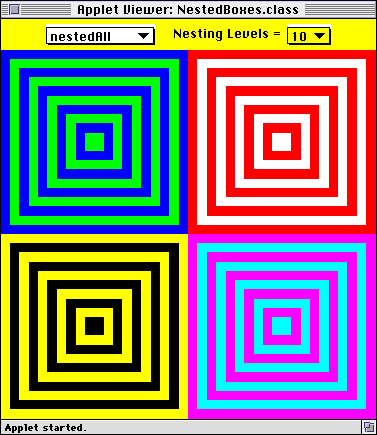
Each of the four patterns consists of concentric rectangular frames that have the same thickness and alternate between two colors. In the above example, each target has 10 nested frames, each of whose thicknesses is 1/20 of the dimensions allocated to the pattern.
In Picture World, such patterns can be drawn as a sequence of concentric filled rectangles, where the rectangles are draw from the outside in. You have been provided with the following method for creating a centered rectangular picture:
public Picture centeredRect (double fraction, Color c)
Returns a rectangle filled with color c that is centered in the picture canvas in which it is drawn. The width and height of the rectangle are each the given fraction of the enclosing picture canvas's width and height. The fraction argument must be between 0 and 1.
For example, using this method, here is a recursive implementation of the nested pattern:
public Picture nestedRec(int levels, double thickness, Color c1, Color c2) {
  if (levels == 0) {
    return empty();
  } else {
    return overlay(nestedRec(levels - 1, thickness, c2, c1),
                   centeredRect(levels*thickness, c1));
  }
}
Here, levels is the number of nested
frames, thickness is the thickness of
each frame edge, c1 is the outermost
color, and c2 is the color that
alternates with c1. The recursion
accumulates a final picture that consists of levels
centered rectangles overlayed on top of
one another. Note how each level of the recursion decrements levels
by 1 and swaps c1 and c2 (so that c2 is the outermost color in the
nested subpicture). This strategy is not a tail recursive one,
since there is still a pending overlay
operation to be performed after the recursion returns.
In the rest of this problem, you will expore three iterative
strategies for expressing the nested box pattern. You will be
fleshing out the following skeletons in the file
NestedFrames.java within the folder
NestedFrames:
public Picture nestedIter(int n, double thickness, Color c1, Color c2) {
  // This method contains the initial call to nestedTail, which does all the work.
  return nestedTail(n, thickness, c1, c2, empty());
}

public Picture nestedTail(int n, double thickness,
                          Color c1, Color c2, Picture ans) {
  // nestedTail should be a tail recursive method that returns a Picture
  // that is the nested frames pattern.

  // Replace the following stub by a correct definition.
  return empty();
}

public Picture nestedWhile(int n, double thickness, Color c1, Color c2) {
  // Use a while loop to accumulate and return a Picture
  // that is the nested frames pattern.

  // Replace the following stub by a correct definition.
  return empty();
}

public Picture nestedFor(int n, double thickness, Color c1, Color c2) {
  // Use a for loop to accumulate and return a Picture
  // that is the nested frames pattern.

  // Replace the following stub by a correct definition.
  return empty();
}
Your task is to flesh out all three methods so that they have the
same behavior as nestedRec. You can test
your methods by executing the
NestedFrames.html applet. This will give you a
window like that pictured at the beginning of this problem. By
selecting an integer in the rightmost choice box, you can change the
nesting level of the patterns. Your code does not have to take care
of calculating the thickness; this calculation is already performed
by the testing enviroment.
The patterns are arranged as follows inside the
NestedFrames Applet window:
nestedRec().
nestedIter().
nestedWhile().
nestedFor().
In your definitions, pay attention to the following notes:
while
loop has the syntax
while (test-expression) {
  body-statements
}
and a Java for loop has the
syntax
for (init-statement; test-expression; update-statement) {
  body-statements
}
A Java for loop is
equivalent to the following
while loop:
init-statement;
while (test-expression) {
  body-statements;
  update-statement;
}levels by 1. You should not decrement
levels by 2!