Reading
IntList Contract
StringList ContractStringListOps.java
in the ps07_programs/Unjumbler folder.LabOps.java
in the ps07_programs/Unjumbler folder.About this Problem Set
The purpose of this problem set is to give you experience with strings, lists, and recursion.
This problem set will be graded using this grade sheet.
Working In Pairs
You are *required* to work in pairs on this entire problem set. You *must* choose a different partner than you had on PS6. (If this is challenging, please talk with/email your lecturer). Use this shared Google Doc to find a pair programming partner and record who your pair partner is.
All work by a team must be a true collaboration in which members actively work together on all parts of the assignment. It is not acceptable for team members to split up the problems and work on them independently. All programming should be done with both team members working at the same computer console. The only work that you may do alone is debugging code that you have written together and talking with the instructors and drop-in tutors.
How to turn in this Problem Set
Your team will submit a single softcopy and hardcopy of the problem set and the same grade will be given to both team members. Write both team members' names on the cover sheet. Include both names in comments in all files. List only the username of the person whose directory we should look in to grade the softcopy.
For general guidelines on problem set submission, including how to submit a softcopy and how to check if you softcopy submission was successful, click here. Please make sure to keep a copy of your work, either on your own computer, or in your private directory (or, to play it safe, both).
Hardcopy Submission
Your hardcopy packet should consist of:- The cover page;
- Your modified
Unjumbler.javafile. - A transcript of the execution of
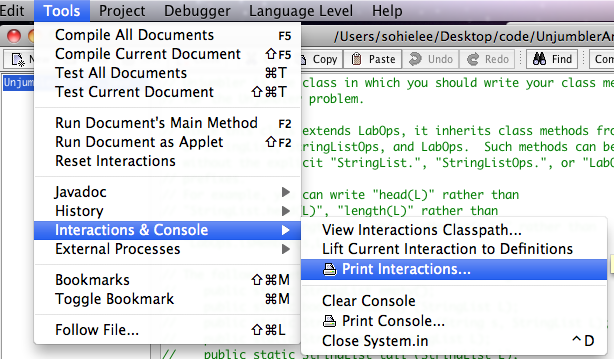
java Unjumbler. This should display test cases illustrating that all your methods from this assignment work correctly. To create a transcript in DrJava, run your program, which should display test cases for all of your methods in the interaction pane. You can then print the contents of DrJava's interaction pane by selecting Tools > Interactions & Console > Print Interactions (see image below). Attach this transcript to your hardcopy.
Softcopy Submission
Save your final version of Unjumbler.java
and submit your entire ps07_programs folder
(not just the files you changed) to your drop folder on the cs111
server. Only one member of a pair programming team
should submit this folder.
Word Unjumbler
Overview
Word Jumble is a popular game that appears in many newspapers and online.
The game involves “unjumbling” English words whose letters
have been reordered. For instance, the jumbled word
ytikt can be unjumbled to kitty. The game
can be challenging; even relatively short jumbles can be tricky to
unjumble. For instance, here are the words that appeared in an
online version of the game; can you unjumble them?:
yandd, hubys, stapol, ungole
In this problem, you will create a Java program that acts
as an "unjumbling assistant". Given a string, your program
will first generate all possible reorderings of the letters in the
string. Such reorderings are called permutations.
For example, there are six reorderings of the letters in
the string tra:
[tra,rta,rat,tar,atr,art]
In general, a string with n distinct letters has n! (pronounced "n factorial") permutations. For instance, a 4-letter string has 4! = 24 permutations, a 5-letter string has 5! = 120 permutations, a 6-letter string has 6! = 720 permutations, and so on.
Next, the assistant will determine which of the permutations
is an English word by looking them up in a dictionary.
You do not have to worry about how to construct such a dictionary;
this has been done for you. Notes on how to use the dictionary as
a "black box" can be found later in this problem description.
In the case of "tra", filtering out the English words
leaves:
[rat,tar,art]
When the string you are unjumbling contains duplicate letters, a
simple permutations generator will yield some duplicate
permutations. For instance, the permutations of "dda"
will generate the 3! = 6 permutations:
[dda,dda,dad,dad,add,add]
Filtering out the English words yields:
[dad,dad,add,add]
In such cases, the unjumbling assistant should also filter out duplicates to yield the final list:
[dad,add]
To get a feel for what the unjumbling assistant does,
you should experiment with the UnjumblerAnswers.class file
in the Unjumbler folder, which contains working methods for unjumbling.
For this assignment, we have provided this file
as an example of how your solution should execute. For example, if you want to see how
your program should behave, you can run the unjumble method
from the UnjumblerAnswers.class
by entering the following in the Dr. Java Interaction pane:
UnjumblerAnswers.unjumble(string-to-unjumble)where string-to-unjumble is a string you wish to unjumble. For example:
> UnjumblerAnswers.unjumble("argle")
[glare,large,regal,lager]
You can use this application to help you solve real Word Jumble puzzles!
Important Note: With its default settings,
DrJava is only able to unjumble words of at most 6 characters.
Attempts to unjumble words longer than 6 characters will encounter a StackOverflowError,
indicating that there is a chain of execution frames that is too long for
the Java Virtual Machine to handle.
Longer words can be handled by modifying the default
stack size used by DrJava for program execution.
This can be done via the following steps:
- In the DrJava window, select
Edit>Preferencesto display the Preferences window. - In the Preferences window, select the Miscellaneous category and the JVMs subcategory.
- In the input line labeled JVM Args for Interactions JVM,
type
-Xss10000k(no spaces). This tells the Java Virtual Machine (JVM) to use a stack with size 10000 kilobytes (about 10 megabytes), which is sufficient for unjumbling 8-character words. - At the bottom of the Preferences window, press the OK button.
- A pop-up window will appear warning you that "Specifying Interactions JVM Args is an advanced option ..." and will ask you if you're sure you want to do this. Press the Yes button.
- In the DrJava window, select
Tools>Reset
Interactions
to make the change take effect.
Your Task
Your task is to create your own unjumbler program, mostly from scratch. To do this, you need to write definitions for the nine class methods specified below.Here are some things you need to know:
- Write all of your definitions in the
Unjumblerclass in the fileUnjumbler.javain theUnjumblerfolder. Carefully read the comments at the top of theUnjumbler.javafile; these tell you which class methods you can use in the file without an explicit class name as a prefix.
- You are not provided with test cases for your methods. You
are required to write your own testing code for this
assignment. You should test each of your methods by adding
appropriate testing code to the
main()method of theUnjumblerclass, just as you did in Lab 8. Recall that thefromString()class method for theStringListclass is a very convenient way to generate a string list. For instancefromString("[I,am,Sam]")yields a three element list containing the strings"I","am", and"Sam".
- In many cases below, you will need a working version of one or
more of the earlier methods to write a later method. In order
to remove the dependency between the different methods, we
have provided you with a class named
UnjumblerAnswersthat contains working versions of each of the nine methods listed below. We have also provided stubs for the methods that invoke the corresponding method from theUnjumblerAnswersclass. This allows you to work on your methods in any order, while still being able to test each method along the way. You must replace the bodies of the seven methods with your own code. (For this to work, yourUnjumblerfolder must have the fileUnjumblerAnswers.class. If you have accidentally deleted this file, you will need to retrieve it again from theps07_programsdownload folder — you do not have the.javafile to generate it.)
public static void main (String[] args)
Displays the results of all the test cases that you will write for the other eight methods on this assignment. You should extend the definition of this method whenever you begin work on one of the other methods. You should test at least all of the examples shown for each method in the method specifications below, but may want to add additional test cases as well.For example, one test case for the
removemethod might display something like the following:remove("I", [I,know,that,I,said,that,I,did]) = [know,that,said,that,did]Note: Study the
mainmethod inLabOps.javato see examples of such test cases.public static StringList remove (String s, StringList L)
Returns a new list in which all occurrences ofsinLhave been removed. The other strings in the list should have the same relative order in the resulting list as in the given list.Examples:
> Unjumbler.remove("I", StringList.fromString("[I,know,that,I,said,that,I,did]")) [know,that,said,that,did] > Unjumbler.remove("that", StringList.fromString("[I,know,that,I,said,that,I,did]")) [I,know,I,said,I,did] > Unjumbler.remove("said", StringList.fromString("[I,know,that,I,said,that,I,did]")) [I,know,that,I,that,I,did] > Unjumbler.remove("you", StringList.fromString("[I,know,that,I,said,that,I,did]")) [I,know,that,I,said,that,I,did]Note: Use the
equals()instance method from theStringclass to compare two strings. For instance,"cat".equals("cat")returnstruebut"cat".equals("dog")returnsfalse. You should not use==to compare two strings because it may not return what you expect. For instance, while"cat" == "dog"is guaranteed to returnfalse,"cat" == "cat"and"cat" == ("c" + "at")are not guaranteed to returntrue. They may return true in some implementations and some circumstances, but you cannot rely on this behavior.public static StringList removeDuplicates (StringList L)
Returns a list containing each string inLexactly once. The order of the elements in the returned list should be the relative order of the first occurrence of each element inL.Examples:
> Unjumbler.removeDuplicates(StringList.fromString("[I,know,that,I,said,that,I,did]")) [I,know,that,said,did] > Unjumbler.removeDuplicates(StringList.fromString("[you,say,what,you,mean,and,mean,what,you,say]")) [you,say,what,mean,and] > Unjumbler.removeDuplicates(StringList.fromString("[lists,are,cool]")) [lists,are,cool]Note: The
removemethod from above is helpful here!public static StringList mapConcat (String s, StringList L)
Given a listLwith n strings, returns a new list with n strings in which the ith string of the resulting list is the result of concatenatingsto the ith element ofL.Examples:
> Unjumbler.mapConcat("com", StringList.fromString("[puter,plain,municate,pile]"))
[computer,complain,communicate,compile]

> Unjumbler.mapConcat("I ", StringList.fromString("[came,saw,conquered]"))
[I came,I saw,I conquered]
public static StringList filterWords (StringList L)
Returns a list of all strings inLthat are English words. The resulting strings should be in the same relative order as inL.Examples:
> Unjumbler.filterWords(StringList.fromString("[the,dog,barked,at,the,cat]")) [the,dog,barked,at,the,cat] > Unjumbler.filterWords(StringList.fromString("[the,dog,barkd,ate,hte,cat]")) [the,dog,ate,cat] > Unjumbler.filterWords(StringList.fromString("[tra,rta,rat,tar,atr,art]")) [rat,tar,art]Note: To determine if a string is an English word, you should use the class method
isWord()that is already defined for you in theUnjumblerclass:public static boolean isWord (String s)
Returnstrueifsis a word in the default English dictionary, andfalseotherwise.The default dictionary (which can be changed within the
Unjumblerclass) contains 22641 English words (all lower case, no proper nouns) of up to 8 characters in length. It is not a "perfect" dictionary: there are some perfectly acceptable English words that are not in the dictionary.You can change the default dictionary to one that contains 45425 English words without a length restriction, but this takes longer to load. For details on how to do this, see the comments near the end of
Unjumbler.java.public static StringList insertions (String s1, String s2)
Given two stringss1ands2, wheres2has n characters, returns a list of n + 1 strings that result from insertings1at all possible positions withins2, from left to right.Examples:
> Unjumbler.insertions("*", "split") [*split,s*plit,sp*lit,spl*it,spli*t,split*] > Unjumbler.insertions("a", "bcd") [abcd,bacd,bcad,bcda] > Unjumbler.insertions("com", "pile") [compile,pcomile,picomle,pilcome,pilecom] > Unjumbler.insertions("abc", "") [abc]Note: The
LabOpsclass contains two helper methods that are useful for defininginsertions:public static String first (String s)
Returns a string consisting of the first character ofs. For example,LabOps.first("computer")returns the string"c".public static String butFirst (String s)
Returns a string consisting of all but the first character ofs. For example,LabOps.butFirst("computer")returns the string"omputer".
Within the
Unjumblerclass, it is not necesssary to use the prefixLabOps.withfirstandbutFirst.public static StringList insertionsList (String s, StringList L)
Returns a list that contains all the strings that result from insertingsat all possible positions in all the strings ofL.Examples:
> Unjumbler.insertionsList("a", StringList.fromString("[bc,cb]")) [abc,bac,bca,acb,cab,cba] > Unjumbler.insertionsList("*", StringList.fromString("[I,am,Sam]")) [*I,I*,*am,a*m,am*,*Sam,S*am,Sa*m,Sam*] > Unjumbler.insertionsList("abc", StringList.fromString("[]")) []Note: The
StringListOpsclass contains a helper methodappendthat is useful for defininginsertionsList:public static StringList append (StringList L1, StringList L2)
Returns a new string list containing all the elements ofL1followed by all of the elements ofL2. For example,> StringListOps.append(StringList.fromString("[I,do]"), StringList.fromString("[not,like,green,eggs]")) [I,do,not,like,green,eggs] > StringListOps.append(StringList.fromString("[I,do]"), StringList.fromString("[]")) [I,do] > StringListOps.append(StringList.fromString("[]"), StringList.fromString("[not,like,green,eggs]")) [not,like,green,eggs]Within the
Unjumblerclass, it is not necesssary to use the prefixStringListOps.withappend.public static StringList permutations (String s)
Returns a list of all permutations of the strings. A permutation of a stringsis any string that is formed by reordering the letters in the strings(without duplicating or deleting any letters). For a string with n distinct characters, there are exactly n! (i.e., "n factorial") permutations. If some characters insare repeated, there are still n! permutations, but the permutations contain duplicates. The elements in the list returned bypermutationsmay be in any order.Examples:
> Unjumbler.permutations("d") [d] > Unjumbler.permutations("cd") [cd,dc] // Could also return [dc,cd]. // Can you see how "c" was glued to permutations("d") to yield permutations("cd")? > Unjumbler.permutations("bcd") [bcd,cbd,cdb,bdc,dbc,dcb] // In this and following answers, could return any permutation of the given answer list. // Can you see how "b" was glued to permutations("cd") to yield permutations("bcd")? > Unjumbler.permutations("abcd") [abcd,bacd,bcad,bcda, acbd,cabd,cbad,cbda, acdb,cadb,cdab,cdba, abdc,badc,bdac,bdca, adbc,dabc,dbac,dbca, adcb,dacb,dcab,dcba] // The above answer list was manually reformatted into rows to make it easier to read. // Can you see how "a" was glued to permutations("bcd") to yield permutations("abcd")? > Unjumbler.permutations("121") [121,211,211,112,112,121] // Could return any permutation of the above list. > Unjumbler.permutations("2121") [2121,1221,1221,1212, 2211,2211,2121,2112, 2211,2211,2121,2112, 2112,1212,1122,1122, 2112,1212,1122,1122, 2121,1221,1221,1212] // The above answer list was manually reformatted into rows to make it easier to read. // Can you see how "2" was glued to permutations("121") to yield permutations("2121")?Note: There are many ways to define the
permutationsmethod, but a particularly elegant way uses thefirst,butFirst, andinsertionsListmethods from above. Be very careful in defining your base case!public static StringList unjumble (String s)
Returns a list of all the permutations ofsthat are English words (as determined by the default dictionary). The order of elements in the resulting list does not matter, but each word in the resulting list should be listed only once.Examples:
> Unjumbler.unjumble("tra") [rat,tar,art] // In this and following answers, could return any permutation of the given answer list. > Unjumbler.unjumble("tras") [rats,arts,star] // the default dictionary doesn't recognize "tars" or "tsar" as words > Unjumbler.unjumble("argle") [glare,large,lager,regal] > Unjumbler.unjumble("sbso") [sobs,boss] > Unjumbler.unjumble("xzzy") []Note: You should only remove duplicates after performing
filterWords. It turns out that performingremoveDuplicateson a large lists (such as the output ofpermutations) can take a very long time. (To understand why this is so, take CS230!)