Graphic by Keith Ohlfs |
|
[CS111 Home Page] [Syllabus] [Lecture Notes] [Assignments] [Programs] [Documentation] [Software Installation] [FAQ] [CS Dept.] [CWIS]
|
Graphic by Keith Ohlfs |
|
[CS111 Home Page] [Syllabus] [Lecture Notes] [Assignments] [Programs] [Documentation] [Software Installation] [FAQ] [CS Dept.] [CWIS]
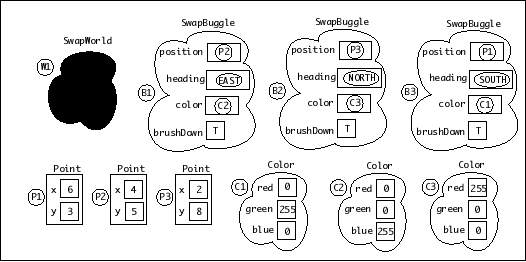
Although the problem only asked for a diagram of Execution Land and Object Land at the end of invoking the run() method, we will show the state of these regions at three distinct times in the computation. The Execution Land and Object Land for Time 3 are what we expected as the answer for Task 1.
Since reference labels are arbitrary, we have chosen reference labels for SwapBuggle, Point, and Color instances that make it easy to track the changes made at the subsequent times. In particular, we have used the labels B1, B2, and B3 for the SwapBuggles and have used corresponding reference labels for their positions (Point instances P1, P2, and P3) and colors (Color instances C1, C2, and C3) at Time 1.
In Object Land, the SwapBuggleWorld instance is shown as a black blob because we are not modeling its state. The SwapBuggle and Color instances are shown as transparent blobs because we are guessing at their instance variables (which are hidden behind an abstraction barrier). The Point instances are shown in rectangles because we know their instance variables.
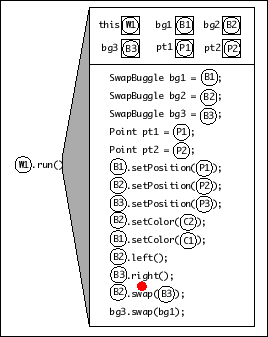
Object Land (at Time 1)
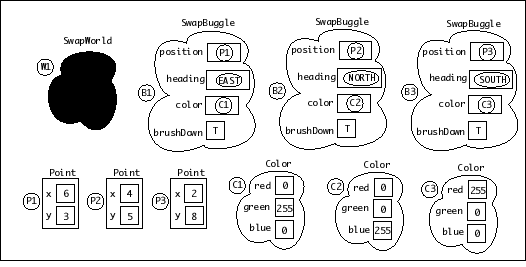
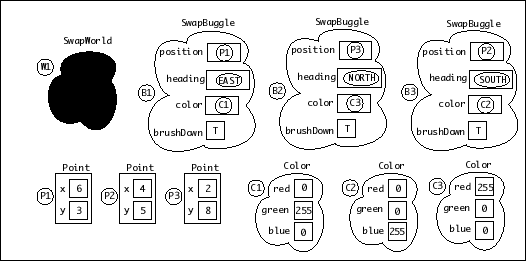
Executing the invocation B2.swap(B3) swaps the contents of the position variables as well as the contents of the color variables in instance B2 and B3. Note that four variable names appear in both the execution frame for run() as well as the execution frame for swap(): this, bg1, pt1, and pt2. However, variables with the same name in different execution frames are logically unrelated. While human beings may find the reuse of names between execution frames confusing, Java does not get confused. Indeed, a key aspect of the Java Execution Model is to explain how Java handles names. Every variable name appearing within an execution frame is resolved relative to the contents of the variable box with that name at the top of the execution frame. When evaluating a variable name within an execution frame, Java never looks at the variable box of a different execution frame.
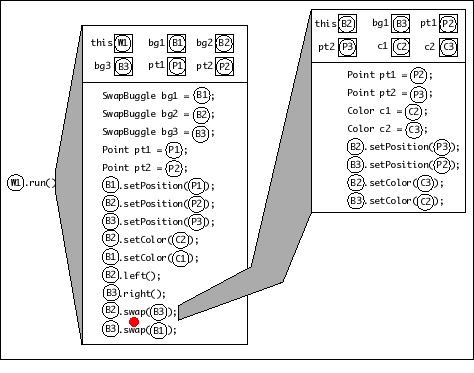
Object Land (at Time 2)
Executing the invocation B3.swap(B1) swaps the contents of the position variables as well as the contents of the color variables in instance B3 and B1. Since B3's variables were already swapped with B2's variables at Time 2, the overall effect is:
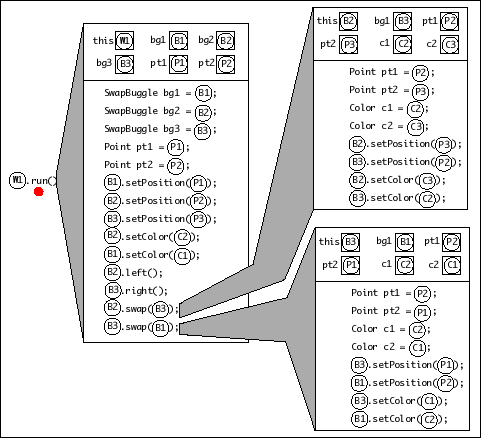
Object Land (at Time 3)
Note: The code discussed here can be found in the CS111 download folder in the file:
Note: The code discussed here can be found in the CS111 download folder in the file:
|
|
|
|
|
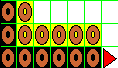
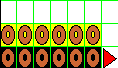
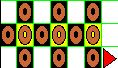
One possible strategy for drawing these patterns is:
We could hand-drop bagels in each pattern, but it helps make the pattern clearer if we create methods to capture common patterns within the four patterns above. Below are some possible methods we could define. In the screen shots below, assume that the buggle started in the lower left corner facing EAST and finishes in the position shown.
|
|
public void singlet (Color c) {
  this.paintCell(c);
  this.dropBagel();
}
|
|
|
public void doublet (Color c) {
  this.singlet(c);
  this.forward();
  this.singlet(c);
}
|
|
|
public void skipDoublet (Color c) {
  this.singlet(c);
  this.forward(2);
  this.singlet(c);
}
|
|
|
public void triplet (Color c) {
  this.singlet(c);
  this.forward();
  this.doublet(c);
}
|
|
|
public void twoColorTriplet (Color c1, Color c2) {
  this.singlet(c1);
  this.forward();
  this.singlet(c2);
  this.forward();
  this.singlet(c1);
}
|
|
|
public void midSinglet (Color c) {
  this.forward();
  this.singlet(c);
  this.forward();
}
|
In order to create the patterns using the strategy outlined above, we define the following three additional auxiliary methods.
|
|
|
public void turnAroundLeft () {
  this.left();
  this.forward();
  this.left();
}
|
|
|
|
public void turnAroundRight () {
  this.right();
  this.forward();
  this.right();
}
|
|
|
|
public void gotoNextGrid () {
  this.right();
  this.forward(2);
  this.left();
  this.forward();
}
|
pattern1()|
|
|
|
|
    public void pattern1 (Color c1, Color c2) {
1:    this.triplet(c1); // bottom row
2:    this.turnAroundLeft();
3:    this.doublet(c2); // two rightmost cells of middle row
4:    this.forward();
5:    this.right();
6:    this.doublet(c1); // left cells of middle and top row
7:    this.right();
8:    this.midSinglet(c2); // middle cell of top row
9:    this.gotoNextGrid();
    }
pattern2()|
|
|
|
    public void pattern2 (Color c1, Color c2) {
1:    this.triplet(c1); // bottom row
2:    this.turnAroundLeft();
3:    this.triplet(c2); // middle row
4:    this.turnAroundRight();
5:    this.forward(2); // top row -- no bagels
6:    this.gotoNextGrid();
    }
pattern3()|
|
|
|
    public void pattern3 (Color c1, Color c2) {
1:    this.midSinglet(c1); // bottom row
2:    this.turnAroundLeft();
3:    this.twoColorTriplet(c1, c2); // middle row
4:    this.turnAroundRight();
5:    this.midSinglet(c1); // top row
6:    this.gotoNextGrid();
    }
pattern4()|
|
|
|
   public void pattern4 (Color c1, Color c2) {
1:    this.skipDoublet(c1); // bottom row
2:    this.turnAroundLeft();
3:    this.twoColorTriplet(c2, c1); // middle row
4:    this.turnAroundRight();
5:    this.skipDoublet(c1); // top row
6:    this.gotoNextGrid();
   }
If we observe the arrangement of the patterns in the rug design carefully, we see that there are a number of commonly occuring pairs of patterns. We can write methods for these patterns as shown below.
|
|
|
|
// This method draws pattern 1 followed by pattern 2.
   public void pattern1_2 (Color c1, Color c2) {
  this.pattern1(c1, c2);
  this.pattern2(c1, c2);
}

// This method draws pattern 2 twice.
   public void pattern2x2 (Color c1, Color c2) {
  this.pattern2(c1, c2);
  this.pattern2(c1, c2);
}

// This method draws pattern 3 followed by pattern 4.
   public void pattern3_4 (Color c1, Color c2) {
  this.pattern3(c1, c2);
  this.pattern4(c1, c2);
}
outerRing()To create the outer ring of the rug, we notice that its four edges
are exactly the same. Therefore, we can write a method
outerEdge which captures that pattern and use that
method inside the outerRing method. The
outerEdge pattern results in the picture shown below.
Notice that the buggle finishes in place to draw the next edge.

public void outerEdge (Color c1, Color c2) {
  this.pattern1_2(c1, c2);
  this.pattern2x2(c1, c2);
  this.pattern2x2(c1, c2);
  this.pattern2x2(c1, c2);
  this.turnCorner();
}

// This method turns the buggle around a corner so it will be
// facing the correct direction to draw the next edge.
   public void turnCorner () {
  this.forward(2);
  this.left();
}
Once we have the outerEdge defined, we can use it
four times to create the outerRing.
public void outerRing () {
  Color c1 = Color.blue;
  Color c2 = Color.red;
  this.outerEdge(c1, c2);
  this.outerEdge(c1, c2);
  this.outerEdge(c1, c2);
  this.outerEdge(c1, c2);
}
innerRing()To create the innerRing, we can follow the same
strategy as we did for the outerRing. This time, though,
the edges are not the same size. Therefore, we can define two
auxiliary methods -- one for each side.

public void innerEdge1 (Color c1, Color c2) {
  this.pattern1_2(c1, c2);
  this.pattern2x2(c1, c2);
  this.pattern2x2(c1, c2);
  this.turnCorner();
}

public void innerEdge2 (Color c1, Color c2) {
  this.pattern1_2(c1, c2);
  this.turnCorner();
}
With those two auxiliary methods defined, the definition for
innerRing becomes:
public void innerRing (Color c1, Color c2) {
  this.innerEdge1(c1, c2);
  this.innerEdge2(c1, c2);
  this.innerEdge1(c1, c2);
  this.innerEdge2(c1, c2);
}
The innerRow and centerRow patterns are
created in the same way. They include a number of pattern
3-pattern 4 pairs followed by a final instance of pattern 3.
Since their specification states that the buggle must start and
finish in the same position, the buggle goes back to its starting
position after finishing the pattern. Their definitions are
below:
// This method draws the inner row of the inner pattern.
   public void innerRow (Color c1, Color c2) {
  this.pattern3_4(c1, c2);
  this.pattern3_4(c1, c2);
  this.pattern3(c1, c2);
  this.backward(15); // return to initial position
}

// This method draws the center row of the rug.
   public void centerRow (Color c1, Color c2) {
  this.pattern3_4(c1, c2);
  this.pattern3_4(c1, c2);
  this.pattern3_4(c1, c2);
  this.pattern3(c1, c2);
  this.backward(21); // return to initial position
}
moveIn() and moveOut()|
|
|
This method moves the buggle to the start of the 3x3 grid which is to the upper right of its current 3x3 grid (assuming the buggle is in the lower left corner of that grid). public void moveIn () {
forward(3);
left();
forward(3);
right();
}
|
|
|
|
This method moves the buggle to the start of the 3x3 grid which is to the lower left of its current position. public void moveOut () {
backward(3);
left();
backward(3);
right();
}
|
innerPattern()innerPattern defined,
we can now create it.public void innerPattern (Color c1, Color c2) {
this.innerRing(c1, c2);
this.moveIn(); // go to position to draw the innerRow
this.innerRow(c1, c2);
this.moveOut(); // return to initial position
}
makeRug()public void makeRug () {
this.outerRing();
this.moveIn(); // to start of lower innerPattern
this.innerPattern(Color.green, Color.orange);
// go to start of centerRow
this.left();
this.forward(9);
this.right();
this.centerRow(Color.blue, Color.red);
// go to start of upper innerPattern
this.left();
this.forward(3);
this.right();
this.innerPattern(Color.cyan, Color.pink);
// back to start of lower innerPattern
this.left();
this.backward(12);
this.right();
this.moveOut(); // to initial position
}